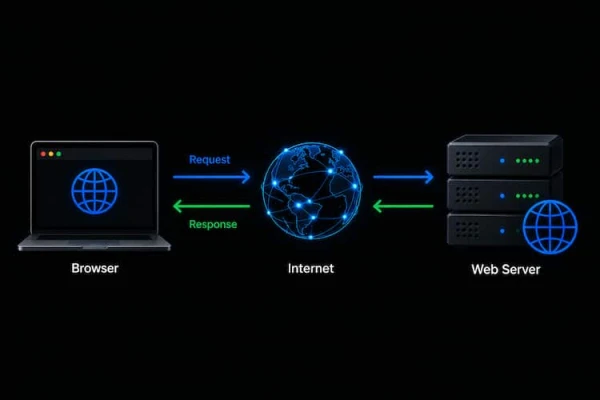
How the OSI Model Works: From Browser Request to Web Server
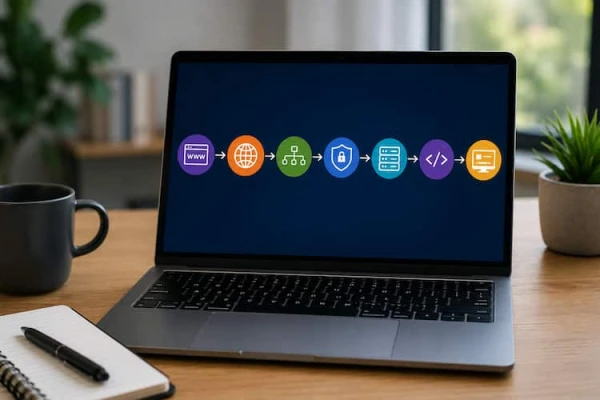
When you type a URL into your browser, press Enter, and see a web page appear within seconds, the process can feel almost magical. In reality, that simple action triggers a highly coordinated sequence of events involving application protocols, DNS resolution, TCP or QUIC, IP routing, Ethernet or Wi-Fi, physical infrastructure, and finally the web server and backend application.
For web developers, understanding what happens behind the browser is more than a networking exercise. It can make debugging easier, improve application performance, and help developers understand problems such as connection timeouts, DNS failures, slow APIs, and 502 Bad Gateway errors.
The OSI model provides a useful conceptual framework for understanding this communication. It divides network communication into seven layers, from the applications users interact with down to the physical signals that carry bits across a network.
This guide explains the OSI model for web developers, following a web request from the browser to a remote server and back again.
Why Web Developers Should Understand the OSI Model
Many developers spend most of their time working at the application level. They write PHP, Python, JavaScript, Laravel applications, REST APIs, database queries, and frontend code.
That is completely normal.
However, not every problem is caused by application code.
Imagine that your Laravel application works perfectly on your local machine but suddenly an API request takes 30 seconds in production. Or perhaps your application returns a 502 Bad Gateway error even though your PHP code contains no obvious error.
Where should you start looking?
The answer may involve several layers:
- DNS resolution
- TCP connections
- TLS negotiation
- IP routing
- firewall rules
- network interfaces
- load balancers
- reverse proxies
- physical connectivity
This is where the OSI model becomes useful.
The OSI model gives developers a structured way to ask:
At which layer is the problem happening?
Instead of randomly changing application code, you can troubleshoot from the bottom or top of the network stack.
The 7 Layers of the OSI Model
The OSI model contains seven layers:
- Application
- Presentation
- Session
- Transport
- Network
- Data Link
- Physical
A useful way to remember the direction of communication is:
Application → Presentation → Session → Transport → Network → Data Link → Physical
When data is sent, it moves conceptually down the stack.
When data is received, it moves back up the stack.
OSI Model Quick Reference
| Layer | Name | Data Unit | Common Examples |
|---|---|---|---|
| 7 | Application | Data | HTTP, DNS, SMTP, DHCP |
| 6 | Presentation | Data | Encryption, encoding, compression |
| 5 | Session | Data | Session establishment and synchronization |
| 4 | Transport | Segment / Datagram | TCP, UDP, QUIC |
| 3 | Network | Packet | IPv4, IPv6, ICMP |
| 2 | Data Link | Frame | Ethernet, Wi-Fi, MAC |
| 1 | Physical | Bits | Copper, fiber, radio signals |
The OSI model is a conceptual model. Modern Internet protocols do not always fit perfectly into one OSI layer. Nevertheless, it remains extremely useful for learning, designing systems, and troubleshooting networks.
Layer 7: The Application Layer
The Application Layer is the layer closest to the software that users interact with.
For web developers, this is usually the most familiar layer.
When you open a website, your browser communicates using application protocols such as HTTP or HTTPS.
For example, a browser may send a request similar to:
GET /articles HTTP/1.1
Host: example.com
The application layer is concerned with how applications communicate and what messages mean.
Common Application Layer Protocols
Some commonly encountered application-layer protocols include:
- HTTP
- HTTPS
- DNS
- SMTP
- FTP
- DHCP
Different applications use different protocols depending on their purpose.
HTTP is used for web communication, SMTP is used for email transmission, and DNS translates domain names into IP addresses.
The Developer Perspective
This is where backend developers spend much of their time.
For example, a Laravel application may receive an HTTP request and process:
- routes
- middleware
- authentication
- controllers
- validation
- database queries
- API responses
Understanding Layer 7 helps explain what your application is actually receiving and sending.
For example, Laravel middleware operates around the HTTP request/response process:
Browser → HTTP Request → Web Server → Laravel → Middleware → Controller → Response
However, HTTP is only the beginning of the journey.
Layer 6: The Presentation Layer
The Presentation Layer is responsible conceptually for how data is represented between systems.
Its traditional responsibilities include:
- data formatting
- encoding
- encryption
- decryption
- compression
For example, two systems may need to agree on how data should be represented before they can correctly interpret it.
Data Formatting
Modern applications commonly exchange data using formats such as:
- JSON
- XML
- binary formats
- Protocol Buffers
A REST API might return:
{
"name": "Fatima",
"role": "developer"
}
The receiving application needs to understand the structure and encoding of that data.
Encryption and TLS
TLS is commonly discussed in connection with the Presentation Layer because it provides encryption and secure communication.
However, there is an important technical detail:
Modern Internet protocols do not map perfectly onto the seven OSI layers.
TLS should therefore not be treated as something that belongs exclusively to Layer 6.
For HTTPS, TLS provides security between the client and server while HTTP provides the application-level communication.
Layer 5: The Session Layer
The Session Layer is responsible conceptually for establishing, maintaining, synchronizing, and terminating communication sessions.
In the original OSI model, this layer helps manage conversations between applications.
Modern web development does not implement the OSI Session Layer as a separate, clearly isolated protocol layer.
Instead, session-related functionality is usually implemented using application-level mechanisms.
Web Sessions in Modern Applications
Modern applications may use:
- Cookies
- Server-side sessions
- JSON Web Tokens (JWT)
- WebSockets
- Authentication tokens
For example, a Laravel application can use a session cookie to associate multiple HTTP requests with the same authenticated user.
This is related to session management, but it should not be confused with the formal OSI Session Layer.
This distinction is important because the OSI model is a conceptual framework, while modern web stacks combine responsibilities differently.
Layer 4: The Transport Layer
The Transport Layer provides communication between applications running on different hosts.
This layer is particularly important for web developers because it deals with concepts such as:
- ports
- reliability
- segmentation
- flow control
- connection management
- multiplexing
The most important transport protocols are TCP and UDP.
Modern web development also requires understanding QUIC, which runs over UDP.
TCP: Reliable Transport
TCP, or Transmission Control Protocol, provides reliable, connection-oriented communication.
Before traditional TCP application data is exchanged, the client and server establish a connection using the famous three-way handshake:
SYN → SYN-ACK → ACK
TCP uses sequence numbers, acknowledgements, retransmission, and flow control to provide reliable delivery.
HTTP/1.1 and HTTP/2 commonly operate over TCP.
TCP and Web Applications
Suppose your browser connects to a traditional HTTPS server.
Conceptually, the stack may look like:
HTTP → TLS → TCP → IP → Ethernet/Wi-Fi → Physical
TCP uses ports to identify applications.
For example:
- HTTP commonly uses port 80
- HTTPS commonly uses port 443
- SSH commonly uses port 22
Ports allow multiple network applications to communicate simultaneously on the same host.
UDP: Lightweight Transport
UDP, or User Datagram Protocol, is connectionless and has much less overhead than TCP.
UDP does not provide TCP-style reliability, ordering, or retransmission.
This makes it useful for applications where low latency and flexibility are important.
Examples include:
- DNS
- real-time applications
- streaming-related protocols
- online gaming
- QUIC
UDP itself does not guarantee that packets arrive correctly or in order.
The application or another protocol above UDP may provide the reliability mechanisms it needs.
HTTP/3 and QUIC
Modern web development makes the TCP-versus-UDP discussion even more interesting.
HTTP/3 uses QUIC, and QUIC runs over UDP.
This means modern web traffic does not always follow:
HTTP → TCP → IP
Instead, HTTP/3 can use:
HTTP/3 → QUIC → UDP → IP → Data Link → Physical
QUIC provides reliable, encrypted, multiplexed communication while using UDP as its underlying transport.
Therefore, the statement that "all web traffic uses TCP" is outdated.
A more accurate statement is:
HTTP/1.1 and HTTP/2 commonly use TCP, while HTTP/3 uses QUIC over UDP.
This distinction is particularly valuable for developers interested in performance optimization and modern networking.
Layer 3: The Network Layer
The Network Layer is responsible for logical addressing and routing packets between networks.
This is where IP addresses become central.
IPv4 and IPv6 operate at this layer.
For example:
Client: 192.168.1.20
Server: 203.0.113.50
The network layer determines how packets can move from the source network toward the destination network.
Routers and Routing
Routers primarily operate at Layer 3.
A router examines the destination IP address and uses its routing table to determine where to forward the packet.
On a large network, traffic may cross many routers before reaching the destination.
For Internet-scale routing, technologies and protocols such as BGP are critical.
Within organizations, routing protocols such as OSPF may be used.
The important concept for developers is:
An IP address identifies a logical network endpoint, while routers determine how traffic moves between networks.
Packets and IP Addresses
At Layer 3, the transport-layer information is encapsulated inside an IP packet.
A simplified view is:
IP Header
↓
TCP/UDP/QUIC information
↓
Application data
The IP header contains important information such as:
- source IP address
- destination IP address
- protocol information
- other control fields
Routers use Layer 3 information to forward packets.
Layer 2: The Data Link Layer
The Data Link Layer is responsible for communication between devices on the same local network segment.
At this layer, packets are encapsulated into frames.
Ethernet and Wi-Fi are major examples of Layer 2 technologies.
MAC Addresses
Network interfaces typically have MAC addresses used for communication on the local network.
A simplified example:
PC
MAC: AA:BB:CC:11:22:33
IP: 192.168.1.20
The IP address is used for logical addressing, while the MAC address is used for local Layer 2 delivery.
Switches
Ethernet switches primarily operate at Layer 2.
A switch learns MAC addresses and uses its MAC address table to determine which port should receive a frame.
For example:
PC → Switch → Router → Internet
The PC may need to send a frame to its default gateway. The switch then forwards that frame according to its MAC address table.
Frames and Error Detection
At Layer 2, packets are placed inside frames.
Ethernet frames include mechanisms such as the Frame Check Sequence (FCS), which uses a CRC-based calculation to detect transmission errors.
If a frame is corrupted, the receiving device can detect the problem.
This is one reason why the OSI model is useful for troubleshooting: different types of failures appear at different layers.
Layer 1: The Physical Layer
At the bottom of the OSI model is the Physical Layer.
This layer deals with the actual transmission of bits.
Examples include:
- Ethernet cables
- fiber-optic cables
- radio signals
- connectors
- transceivers
- electrical signals
- optical signals
- wireless frequencies
At this level, the abstract idea of a packet eventually becomes physical signals traveling through a medium.
Physical Network Problems
A physical problem can cause higher-level applications to fail even when the application code is perfect.
For example:
Broken cable
↓
No physical link
↓
No Layer 2 communication
↓
No IP communication
↓
No TCP/QUIC connection
↓
No HTTP response
↓
Website appears unavailable
This demonstrates an important troubleshooting principle:
A problem at a lower layer can prevent higher layers from functioning correctly.
From Browser to Web Server: The Complete Journey
Now let's put everything together.
Imagine that you type:
https://example.com
into your browser.
What happens?
Step 1: DNS Resolution
The browser needs to discover the IP address associated with the domain name.
A DNS lookup may eventually return an address such as:
example.com → 203.0.113.50
DNS itself is an application-layer protocol, but the DNS query still travels through lower networking layers.
Step 2: Establishing Communication
Depending on the HTTP version being used, the browser may establish communication using TCP/TLS or QUIC.
For traditional HTTPS using TCP:
TCP three-way handshake
↓
TLS negotiation
↓
Secure HTTP communication
For HTTP/3:
QUIC over UDP
↓
Encrypted HTTP/3 communication
Step 3: Encapsulation
The browser creates application data.
That data moves down through the networking stack.
Conceptually:
HTTP data
↓
Transport information
↓
IP packet
↓
Ethernet/Wi-Fi frame
↓
Physical bits/signals
Each layer adds information required for communication.
This process is called encapsulation.
Step 4: The Network
The frame travels across the local network.
The router receives the traffic and forwards the packet toward the destination.
The packet may cross many routers and autonomous systems before reaching the server.
Step 5: The Server
The destination system receives the physical signals and reconstructs the data.
Conceptually, the process is reversed:
Physical
↓
Data Link
↓
Network
↓
Transport
↓
Security/Application protocols
↓
Web server
↓
Backend application
This reverse process is commonly described as decapsulation.
Step 6: The Backend Application
Eventually, the HTTP request reaches software such as:
- Nginx
- Apache
- IIS
- Node.js
- PHP
- Laravel
- Django
- ASP.NET
For example:
Browser
↓
Internet
↓
Nginx
↓
PHP-FPM
↓
Laravel
↓
Controller
↓
Database
Laravel processes the request and generates a response.
The response then travels back through the network to the browser.
OSI Model and Real-World Troubleshooting
The biggest practical advantage of understanding the OSI model is troubleshooting.
Consider a website that does not load.
Instead of immediately modifying PHP code, you can troubleshoot systematically.
Layer 1 Questions
- Is the cable connected?
- Is the network interface working?
- Is Wi-Fi available?
- Is the link up?
Layer 2 Questions
- Is the correct VLAN configured?
- Is the switch port operational?
- Is the MAC address being learned?
- Is there a trunk/access-port problem?
Layer 3 Questions
- Does the host have a valid IP address?
- Is the default gateway correct?
- Can the host ping its gateway?
- Is routing configured correctly?
Layer 4 Questions
- Is the destination port reachable?
- Is TCP connecting?
- Is a firewall blocking the connection?
- Is the server listening on port 443?
Higher-Layer Questions
- Is DNS resolving correctly?
- Is TLS working?
- Is the HTTP request valid?
- Is Nginx or Apache running?
- Is the Laravel application responding?
This approach prevents developers from treating every network problem as an application problem.
OSI vs TCP/IP: An Important Distinction
The OSI model is excellent for learning networking, but the real Internet is commonly described using the TCP/IP model.
The TCP/IP model has fewer layers and groups some OSI responsibilities together.
A simplified comparison looks like this:
| OSI Model | TCP/IP Model |
| Application | Application |
| Presentation | Application |
| Session | Application |
| Transport | Transport |
| Network | Internet |
| Data Link | Network Access |
| Physical | Network Access |
This is why developers should avoid thinking that every modern protocol belongs perfectly to exactly one OSI layer.
The OSI model is best understood as a conceptual troubleshooting and learning framework.
Why the OSI Model Matters for Software Engineers
Understanding networking can significantly improve a developer's ability to diagnose real-world problems.
For example, knowing the difference between these errors is valuable:
DNS failure
The domain cannot be resolved.
Connection refused
The destination can be reached, but the service may not be listening on the expected port.
Connection timeout
Traffic may be blocked, routed incorrectly, or the destination may not respond.
TLS error
The secure connection negotiation or certificate configuration may be failing.
502 Bad Gateway
A reverse proxy such as Nginx may be unable to communicate correctly with the upstream application.
These problems may appear in the browser as simple error messages, but their causes can exist at completely different layers.
Conclusion
The OSI model is much more than a diagram that appears in networking certification exams.
For web developers, it provides a mental model for understanding what happens between the moment a user enters a URL and the moment the server returns a response.
The journey can involve:
Application → Transport → Network → Data Link → Physical
along with DNS resolution, encryption, routing, switching, TCP, UDP, QUIC, and modern HTTP protocols.
Understanding these layers helps developers move beyond simply writing application code. It allows them to investigate the infrastructure underneath their applications and communicate more effectively with network engineers, system administrators, DevOps teams, and cloud engineers.
Whether you are building Laravel applications, Python services, REST APIs, microservices, or cloud infrastructure, networking knowledge gives you a powerful advantage.
The next time a web page loads almost instantly, remember that behind that simple click is a complex chain of protocols, devices, addresses, packets, frames, and physical signals working together.
That is the real journey from browser to server.
Related Posts
- What Is DNS and How Does It Work in Active Directory?
- Understanding Laravel Middleware — How Requests Travel Through Your Application
- Laravel Method Not Allowed (405) Error — Causes, Fixes, and What It Really Means
- Laravel Routing Errors — Complete Fix Guide
- Laravel Debugging Guide (2026) — Fix Any Error Even Without Error Messages
- Laravel Works Locally but Not on Server — The Hidden Differences You Must Understand
- How a Web Browser Works: From URL to Web Page


























Discussion 0